Quick overview · 4 min
What is Teacher Sorted?
See how Teacher Sorted helps you get work out of your head, see what fits and make the most of the time you have.
Open video in a new playerHOW IT WORKS
Put the emails, parent calls, marking and meeting jobs in one place. Then choose your priorities and let Teacher Sorted help you find time for them around lessons. Start the day with a plan you can use, even when school changes things.
Teacher Sorted is a workload planner for the work around teaching. It helps you choose what needs doing first and plan it alongside your timetable, without expecting you to work every available minute.
SEE TEACHER SORTED IN ACTION
Take a real look at the app. Watch the short overview, or follow a guide to capturing work and setting up the time you actually want to use.
Quick overview · 4 min
See how Teacher Sorted helps you get work out of your head, see what fits and make the most of the time you have.
Open video in a new playerQuick guide · 2 min
Use ordinary words to add recurring work, set a reminder and save a note.
Open video in a new playerQuick guide · 3 min
Create a work block, choose its context and focus suitability, and repeat it on other days.
Open video in a new playerGET IT OUT OF YOUR HEAD
That job you remembered at 3am, a parent call scribbled on a Post-it, the follow-up from a meeting: type it in ordinary words and check the details before saving it. You can add it now without choosing a time yet.
Forward emails that need action to your private Teacher Sorted address. For a message in a parent app, add the job yourself. Keep pupil names and sensitive information out of what you enter.
In Teacher Sorted: Tell Teacher Sorted picks out the job, deadline and rough time from your words so you can check them.
Tell Teacher Sorted
Mark English books by Friday. 45 mins.
Upload homework
Routine · returns each Friday
Sort science display
Needs Details · safe until you know more
CHOOSE YOUR PRIORITIES
Choose what matters today, whether that’s marking, meeting preparation or a parent call. Teacher Sorted helps you fit that work around the PPA, frees and other non-teaching time you want to use.
For each work block, tell Teacher Sorted how many minutes you genuinely expect to have. Those minutes are the capacity it plans with. Mark a block as suitable for uninterrupted focus when a job needs more concentration.
Add the PPA, preparation periods or other non-teaching time you genuinely want to use. Before-school, evening and weekend time only appears if you choose it.
Keep your teaching timetable alongside the rest of your plan in Today and Week, if that helps. Build it yourself or upload the timetable you already use, including a Week A/B pattern.
Look at Today to see your plan and where to start. Check Week to see how the important jobs fit around teaching and meetings. You’re choosing what to do, not filling every spare minute.
The other jobs stay in Work until you decide when to tackle them. If you choose more work than you’ve made time for, Teacher Sorted shows that clearly so you can adjust your priorities.
Start my day suggests work for the time you have available. Got twenty minutes? See what fits. Bigger jobs can be split across a few sessions, so your priorities can keep moving.
In Teacher Sorted: Start my day can suggest a plan using the work time you’ve added. You choose the priorities and can change the suggestion.
Weekly reset
Usable work time
5h 15m
Work currently included
4h 20m
Your week still fits.
Nothing needs reorganising. A quick confirmation is enough.
Tuesday
Mark English books
Thursday
Plan next week’s maths
Friday
Upload homework
Work that is not relevant to this week can stay safely in Work. The reset is a check, not a demand to organise everything.
WHEN SCHOOL HAS OTHER IDEAS
A parent call runs over, a meeting gets added or an urgent job needs attention. The priorities you chose at 8am might need changing by lunchtime.
Add the change, see how today’s plan looks now and decide what to do next. Teacher Sorted keeps deadlines and the rest of your work visible while you choose what moves.
This week
Work planned
4h 55m
Time available
4h 20m
About 35 minutes needs a decision.
Move another job, choose a different day, make more time if you genuinely want to, or leave the shortfall visible.
After you decide
The week now fits.
Teacher Sorted stops there. It does not fill the space again.
SEE YOUR PROGRESS
See what you’ve completed and what’s still in the plan. Leave a note about where to start next time, so nothing has to be kept in your head overnight.
When you’ve done the work you chose for today, stop. Return Brief will help you pick up next time without reconstructing the whole week.
In Teacher Sorted: Finish for now records a restart point. Return Brief helps you pick up where you left off.
Finish → return
Finish for now
Done with this work session?
Leave a restart point without reviewing the whole day.
Return to
Finish Thursday’s slides
Future-self note: resources are already in the shared folder.
When you return
Here’s where you left things
Restart point
Finish Thursday’s slides
Usable time now
45 minutes
Since you stopped
Nothing important changed
THE LITTLE THINGS THAT MAKE THE DAY LIGHTER
Reminders, regular jobs and the work waiting on someone else stay in view, so you can concentrate on the things you’ve chosen to do today.
Use Tell Teacher Sorted and type it as you would explain it to another teacher. It picks out the job, date and rough time, then lets you check what it understood.
In Teacher Sorted: Get it out of your head
Forward a work email, or send a new message to your private Teacher Sorted address. The clearest action becomes work without you retyping it.
In Teacher Sorted: Email Teacher Sorted
Use Tell Teacher Sorted to say that a job needs longer, has changed or is finished. It can update the existing work and checks when the match is not clear.
In Teacher Sorted: Tell it when something changes
Tell Teacher Sorted when something has to be done. It keeps the deadline with the job, helps you plan towards it and can remind you when something needs a nudge.
In Teacher Sorted: Keep on top of deadlines and reminders
Something for later in the term? Save it now and choose when it should come back into your planning. It stays in Work without competing with this week’s jobs.
In Teacher Sorted: Remember it now. Come back to it when it matters.
If a job can only happen after something else, Teacher Sorted can hold it back until it is actually possible.
In Teacher Sorted: Do things in the order they are actually possible
Use your PPA, frees and whatever before- or after-school time you choose. Teacher Sorted plans with that time, not an imaginary empty day.
In Teacher Sorted: Plan around the time you really have
See what you have planned, what still needs a home and where the week is running out of room. On desktop, zoom in or out and rearrange it.
In Teacher Sorted: See where the week is getting tight
See what you have planned for today, what is due and what could fit if you get a spare gap.
In Teacher Sorted: Know what to do today
See useful jobs that actually fit the time you have got.
In Teacher Sorted: Got 20 minutes?
Lose PPA, a free period or time to a meeting? See what has been squeezed out so you can decide what moves, waits or needs a conversation.
In Teacher Sorted: School changed the plan?
Use school patterns, holidays and one-off changes without rebuilding your whole setup every time the week changes shape.
In Teacher Sorted: Week A/B? Holidays? One-off changes?
Weekly marking, admin and other regular jobs can return automatically, so you do not have to keep remembering to add them.
In Teacher Sorted: Regular jobs come back on their own
A two-hour job does not need a two-hour gap. Teacher Sorted can build a split plan across suitable blocks and keep the time left visible as you make progress.
In Teacher Sorted: Break big jobs into the time you have
Start a work timer on a task, pause for interruptions or choose a focus countdown. No separate timer app needed.
In Teacher Sorted: Keep track while you work
Leave yourself a clear next step, close the laptop and come back knowing where to pick up.
In Teacher Sorted: Stop work without losing the thread
Put planned Teacher Sorted work into Google Calendar, Outlook or Apple Calendar through a private, read-only feed you can turn off.
In Teacher Sorted: See Teacher Sorted in your calendar
Your workspace is private. You decide what moves, what waits and how much of your time is available.
In Teacher Sorted: Your workload stays yours
YOUR TEACHING TIMETABLE
You've already got a timetable. You shouldn't need to type it all out again. Upload a photo, PDF, Word document or spreadsheet, then check and edit what Teacher Sorted has picked out. Or build your own.
Colour-code lessons, use Week A and Week B, and make changes for a particular week. Show the timetable in Today and Week if it's useful, or print and download a copy.
Your lessons stay on the timetable. Teacher Sorted helps you plan the marking, preparation and admin around them.
Try it with your timetableMy teaching timetable
Week A
| Time | Mon | Tue | Wed |
|---|---|---|---|
| 09:00 | Maths | English | Maths |
| 10:30 | English | Science | Art |
| 13:00 | PE | Maths | English |
The full walkthrough takes you through the workspace and how the pieces fit together.
Full walkthrough · 13 min
Explore the whole workspace, from capturing work to planning your week and working through Today.
Open video in a new playerIN TEACHERS’ OWN WORDS
These guys really understand how a teacher works.
This is how managing my work–life balance should feel.
THE POINT OF IT ALL
Put the work in one place, choose what matters and make the best use of the time you have. See what you’ve done, know where to start tomorrow and finish with a clearer head.
Card required. £0 today. Cancel before the first charge.
ADMIN SORTED · NOW INCLUDED
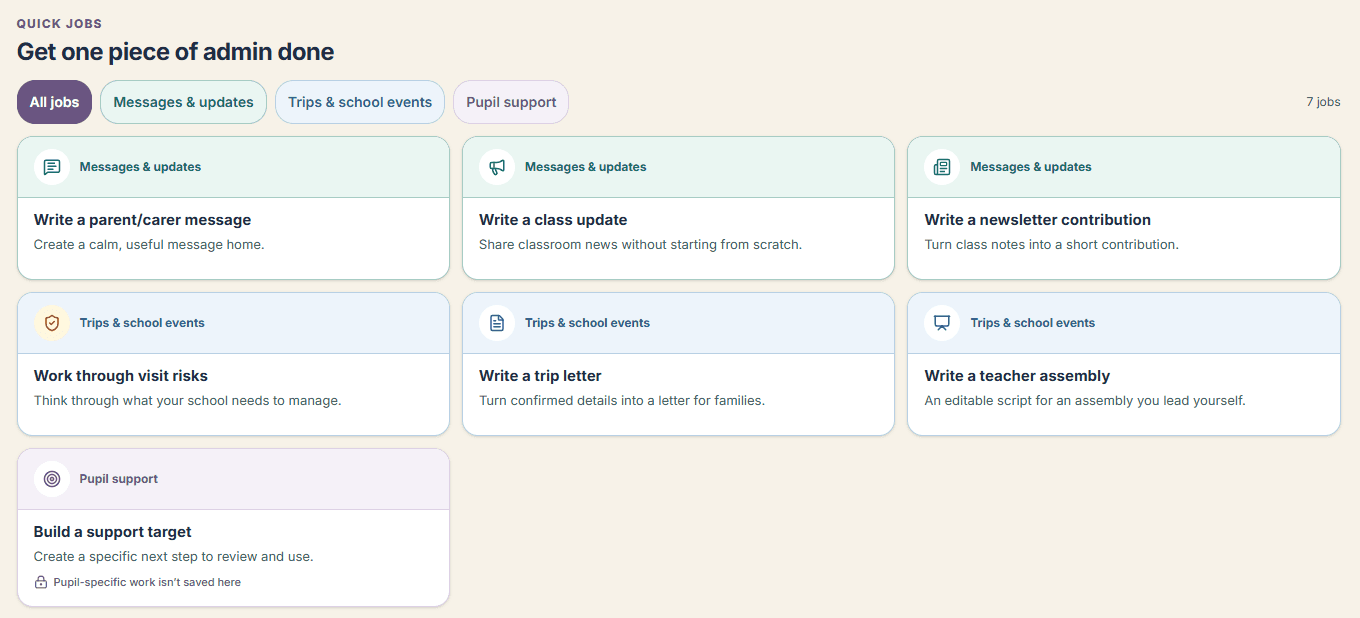
Use Admin Sorted to get the parent message, class update or trip letter started. Add the details, then review and edit the draft before sending it.
Build or upload a teaching timetable, keep a trip or assembly together and add preparation jobs to the workload plan. Less starting from scratch after the children have gone home.
Explore Admin SortedIncluded in your Teacher Sorted trial and membership.