Teacher Sorted

A WORKLOAD PLANNER FOR TEACHERS

Your lessons have a timetable. Now give the rest of your work a plan.

Planning, emails, parent messages, marking, staff meetings... There's always so much to remember! Teacher Sorted gives all these jobs a place, helps you choose what matters today and find time for it around your teaching. Start with a plan, work on the most important jobs, and finish knowing what’s done and what comes next.

Teacher-made, for real teaching weeks.

See Teacher Sorted in action.Four minutes to see how the work gets captured, planned and fitted into a teacher’s real week.
Quick setupTry it free for a week!For Primary, Secondary and TutorsMade for teachers, by teachers
Know what matters today
Keep all your work in one place
Find the right job for the time you have
Know where to pick up tomorrow

GET THE WORK OUT OF YOUR HEAD

That job you remembered at 3am? Give it somewhere better to live.

The email you remember in the middle of the night. The parent call on a Post-it. The job scribbled in a notebook you left on your desk. Put everything somewhere reliable, then choose when you’re going to deal with them.

The jobs don't stop arriving just because you're teaching.

An email comes in during maths. A meeting creates three follow-up jobs. There's a letter to write, a trip to organise, marking to finish and tomorrow to prepare. Add the jobs as they appear. Decide which need doing first and find time for them when you’re ready.

Emails arriving during lessons

Forward the ones that need action

Parent messages and calls

Add jobs from school messaging apps

Marking, planning and preparation

Keep the next job somewhere reliable

Trips, events and assemblies

Keep arrangements and follow-ups together

Meetings and leadership work

Remember what needs doing before and after

Type a job in Teacher Sorted, or forward an email to your private Teacher Sorted address. Choose what matters today, then use Today and Week to plan the work. Messages from parent apps can be added manually; emailed jobs arrive when you forward them. Check the details before saving, and leave pupil-identifiable information out.

TELL TEACHER SORTED

Get it all out of your head.

A message in the parent app, an email to follow up, a letter to write. Or a job scribbled on a Post-it. Add it in ordinary words and let Teacher Sorted keep it safe and find the best time to deal with it.

You don’t have to work out the whole plan before you add a job.

Save it without choosing a slot. Add missing details when you know them.

YOU TYPE

“Mark Year 5 maths books by Thursday, about 40 minutes.”

Useful details picked out
Job
Mark Year 5 maths books
Deadline
Thursday
Time estimate
40 minutes
Illustrative example. Check or change the details before planning.
EMAIL TEACHER SORTED

That email can become a job in your plan.

Thought of a job while checking your emails? Send it to Teacher Sorted. Been sent something you need to do? Forward it. No need to open another app and copy it across.

FORWARD AN EMAIL OR WRITE A NEW ONE

Every account gets a private Teacher Sorted email address. Forward something you have been sent, or send a new email yourself from Outlook or Gmail. Teacher Sorted turns the clearest action into work and keeps the source email for reference.

No duration in the email? It waits safely in Needs Details instead of guessing.

It only receives what you send to that address, not access to your inbox. One clear job per email works best.
NOT FOR THIS WEEK?

Think of it now. Come back to it when it matters.

Thought of something for later in the term? Save it now and choose when it should come back into your planning. It stays in your Work List without competing with this week’s jobs.

You can still find it or bring it forward. If a deadline needs attention sooner, Teacher Sorted still shows it.

Decide what matters. Find the time to do it.

Choose your priorities for today: marking, meeting prep' or the follow-up with a parent. Teacher Sorted helps you see where they fit into your PPA and other work time. Got an unexpected twenty minutes? Find a useful job that fits.

Keep your priorities when the day changes.

PPA moved last minute? Meeting overran? Something urgent arrived? Just another day at school! Add the change and let Teacher Sorted help you to decide what gives. Nothing is rearranged without your say. You stay in control.

YOUR DAY, WITH A PLAN

Know what matters today, and when you’re going to do it.

Marking to do, a parent to ring and a meeting to prepare for. Teacher Sorted helps you choose what’s important, use the time you’ve got and keep the rest of the week in view.

CHOOSE WHAT MATTERS TODAY

Begin the day knowing what to work on.

Choose the important jobs for today. Teacher Sorted helps you see how they fit into PPA, frees and other working time, so you can get started knowing what to tackle first.

How it works: Start my day can suggest what fits into your available work blocks. Use the suggestion, change it or choose your own priorities.

WHEN THE SCHOOL DAY CHANGES

Adjust the plan and carry on.

An unexpected meeting, a parent call or another urgent job can change what matters today. See the time you have left and choose what to do next.

How it works: See your jobs and your work time together. Adjust the plan yourself; nothing gets silently rearranged.

FINISH KNOWING WHERE YOU STAND

See what you’ve done. Know what’s next.

Check what you finished, what still needs attention and where to start next time. When you’ve done the work you chose for today, you can stop.

How it works: Finish for now keeps a restart point. Return Brief shows where to pick up.

Keep all the jobs somewhere reliable. Give your priorities time in the week. You decide when your working day is done.

Try it with this week’s workload

IN TEACHERS’ OWN WORDS

A few words from teachers.

These guys really understand how a teacher works.
Chris · Teacher
This is how managing my work–life balance should feel.
Joe · Teacher

THE WORK, THE TIME AND THE PLAN

Know what to work on. Make the time you have count.

Choose the jobs that matter, use Today to see what fits into the time you’ve set aside, and make progress even when the gaps are short.

Start the day with a plan

Start with the work that matters today.

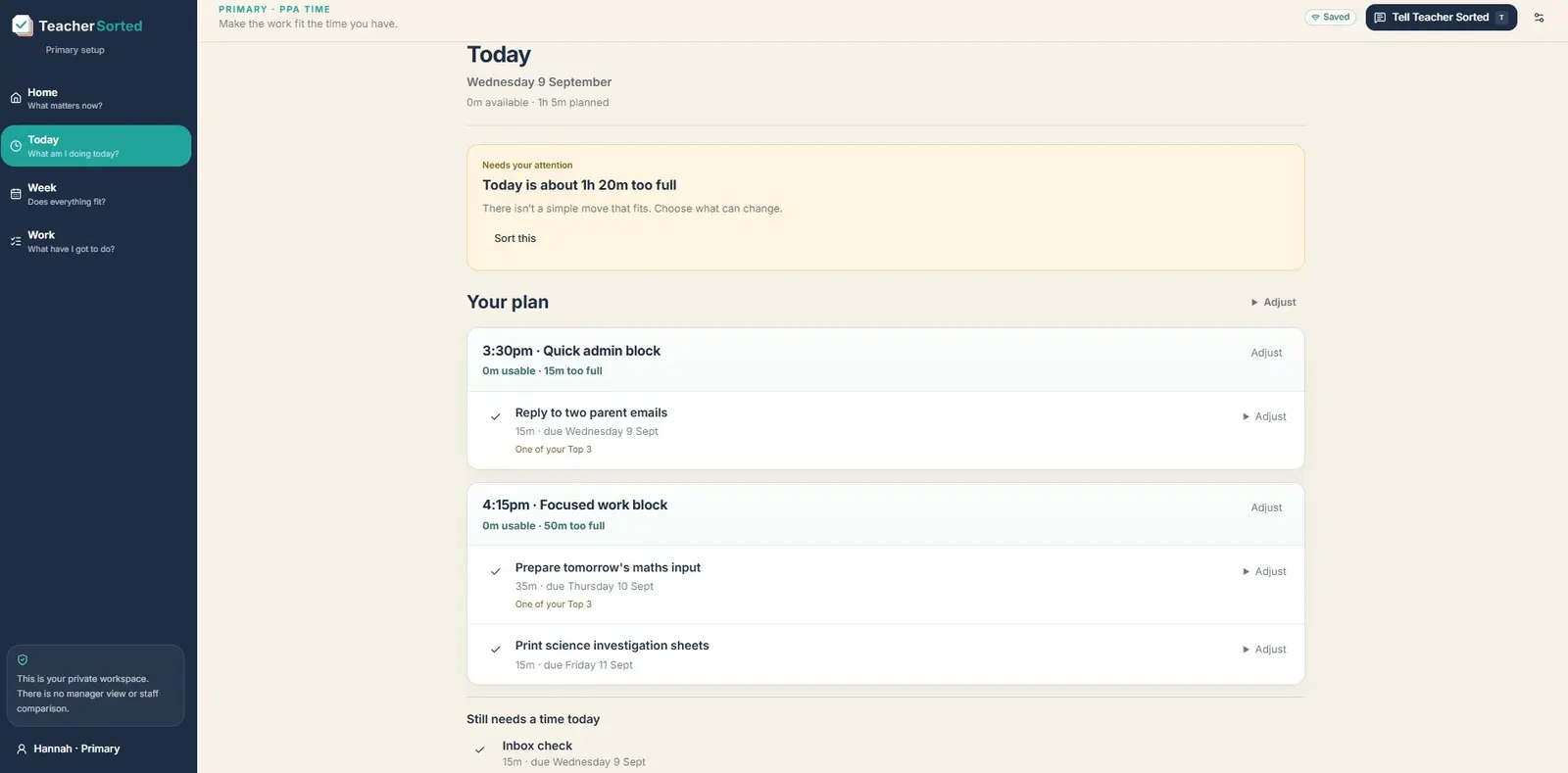
Choose your priorities, then open Today for a suggested plan based on your available work time. See what to tackle first, change the order or choose a different job.

You choose what matters. Teacher Sorted helps you find time for it.

A real Teacher Sorted Today screen showing work in the daily planner
Real Teacher Sorted Today screen.
Let a big job use smaller gaps

Make progress on bigger jobs in the time you have.

A two-hour job doesn’t need a two-hour gap. Tell Teacher Sorted the job can be done in chunks, and it can suggest how to spread it across the time you have.

Update how much is left as you go. The remaining work stays with the job.

THE BIG JOB

Review assessment notes

2 hours 30 minutes to fit into the week

Monday45 minutes
Wednesday45 minutes
Thursday60 minutes

Three manageable sessions. No imaginary two-and-a-half-hour gap required.

Illustrative example of how the work is handled.
See the plan in your calendar

Know when your planned work is happening.

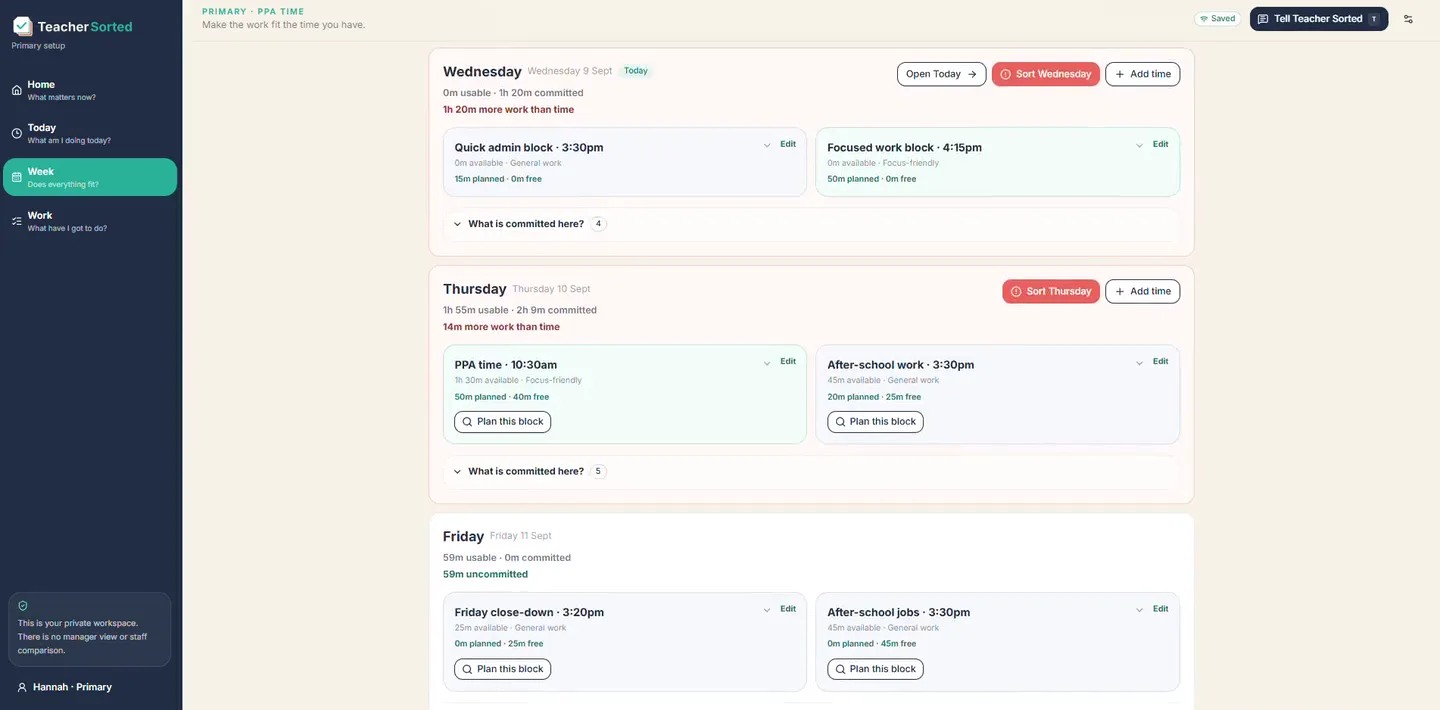
See your plan in the calendar you already use. Connect a private Teacher Sorted feed to Google Calendar, Outlook or Apple Calendar. Make changes in Teacher Sorted, and turn the feed off whenever you like.

One-way, read-only. Your calendar shows the plan; changes made there don’t move work in Teacher Sorted.

A real Teacher Sorted Week screen with the planned working week
Real Teacher Sorted Week screen. The private calendar feed also shows planned work in your usual calendar.

YOUR TEACHING TIMETABLE

Know what's coming. Keep the work around it in view.

You've already got a timetable. You shouldn't need to type it all out again. Upload a photo, PDF, Word document or spreadsheet, then check and edit what Teacher Sorted has picked out. Or build your own.

Colour-code lessons, use Week A and Week B, and make changes for a particular week. Show the timetable in Today and Week if it's useful, or print and download a copy.

Your lessons stay on the timetable. Teacher Sorted helps you plan the marking, preparation and admin around them.

Try it with your timetable

My teaching timetable

Week A

Week B also saved
TimeMonTueWed
09:00MathsEnglishMaths
10:30EnglishScienceArt
13:00PEMathsEnglish
Upload Colour-code Week A/B Print
Illustrative timetable, not a screenshot. Your lessons, colours and school week will be different.

ADMIN SORTED · NOW INCLUDED

The letters, timetables and assemblies still need doing.

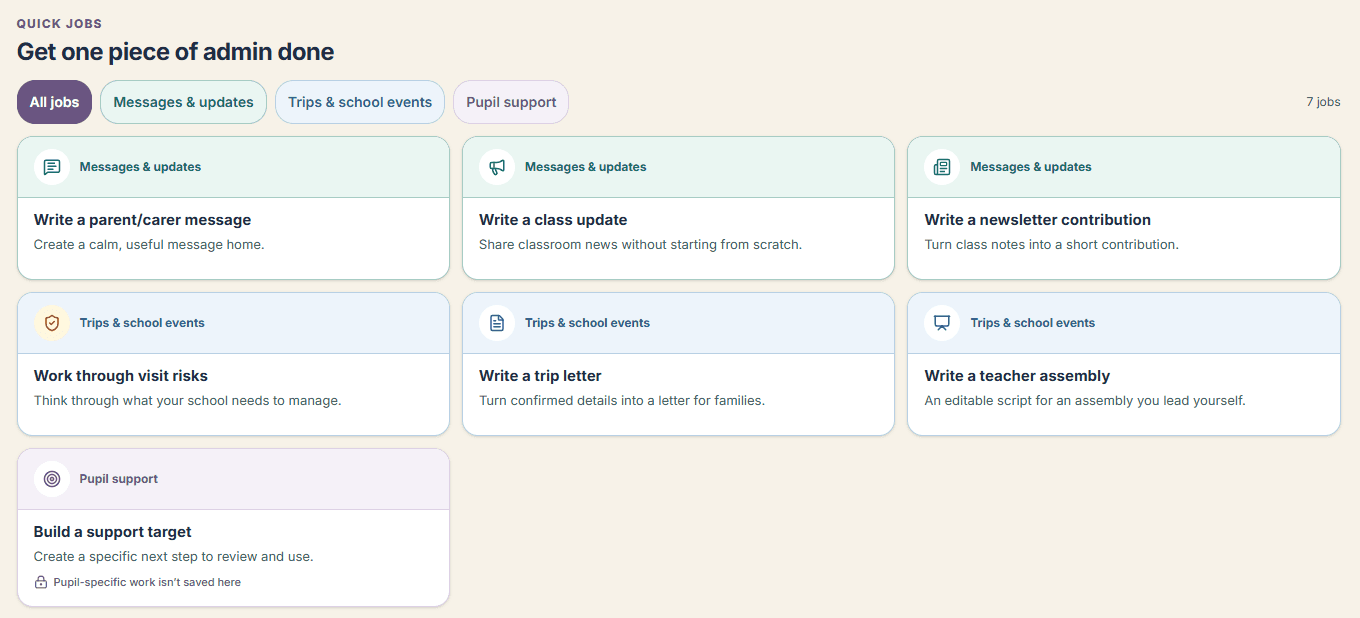
Use Admin Sorted to get the parent message, class update or trip letter started. Add the details, then review and edit the draft before sending it.

Build or upload a teaching timetable, keep a trip or assembly together and add preparation jobs to the workload plan. Less starting from scratch after the children have gone home.

Explore Admin Sorted

Included in your Teacher Sorted trial and membership.

Admin Sorted’s seven quick jobs, including parent messages, class updates, trip letters and assemblies
Choose the job you need help with. You check the finished draft before using it.

YOUR WORKLOAD, IN ONE PLACE

Take your plan with you.

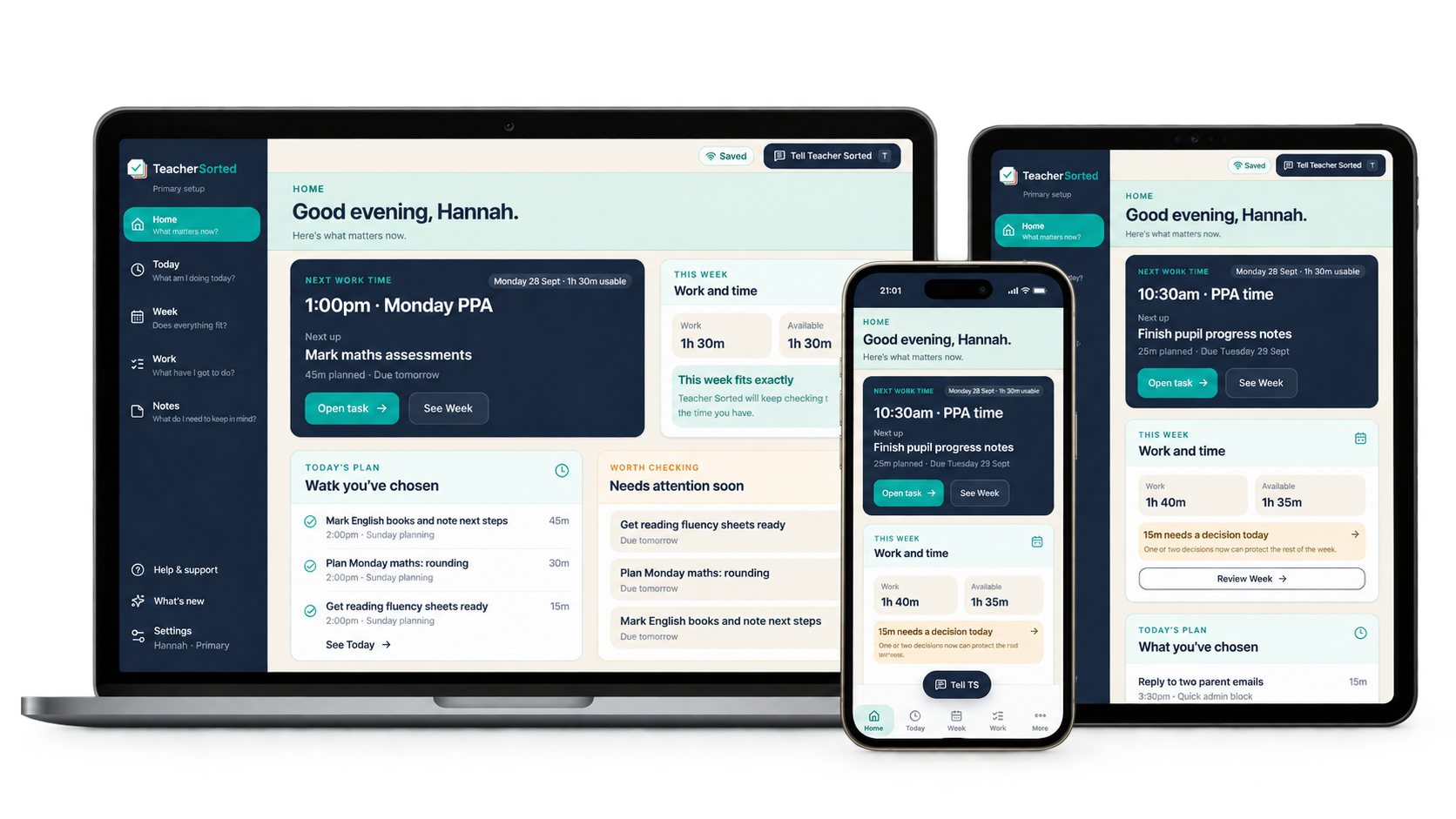
See your work and your available time together on a laptop, tablet or phone. Add something as it comes up, then return to the same plan when you’re ready.

Teacher Sorted shown across desktop, tablet and mobile

MADE FOR THE WORK AROUND TEACHING

School work doesn’t behave like a normal to-do list.

Start with categories for teacher work, not an empty board. Marking, preparation, assessment, parent contact and pastoral work already have a place. You add your real jobs and choose the time you’re prepared to use.

Primary starting categories include

PlanningPreparation & resourcesAssessment & feedbackCommunication

Secondary starting categories include

Marking & feedbackPastoralParent/carer contactDepartment / collaboration

Your work time is yours to choose

Add PPA, frees and any other time you want to use. Evenings and weekends aren’t included unless you choose them. A work block can be suitable for uninterrupted focus; that changes which jobs fit there, not how many minutes you have.

A moved job still keeps its deadline

If a job due Friday is planned for Monday, Friday still shows as its deadline.

Stop adding the same job every week

Weekly marking, admin and other routines can return without you adding them again.

A plan for one-week and two-week timetables

Week A/B, holidays and one-off changes can fit without rebuilding everything from scratch.

PRIMARY

Keep marking, planning, parent messages, trips and meeting jobs together. Choose what matters today and find time for it around PPA and your timetable.

Teacher Sorted for Primary

SECONDARY

From marking and pastoral follow-ups to meetings and leadership jobs, see your priorities alongside frees and Week A/B. Use the time you have for the right work.

Teacher Sorted for Secondary

THE PRACTICAL DETAILS

Stay on top of the details without keeping them all in your head.

See deadlines, recurring jobs and work that still needs planning without having to remember them all. When PPA disappears, see what is left to fit.

Add it while it’s in your head.

Use Tell Teacher Sorted and type it as you would explain it to another teacher. It picks out the job, date and rough time, then lets you check what it understood.

In Teacher Sorted: Get it out of your head

Keep the deadline with the job.

Tell Teacher Sorted when something has to be done. It keeps the deadline with the job, helps you plan towards it and can remind you when something needs a nudge.

In Teacher Sorted: Keep on top of deadlines and reminders

Find time for your priorities around teaching.

Use your PPA, frees and whatever before- or after-school time you choose. Teacher Sorted plans with that time, not an imaginary empty day.

In Teacher Sorted: Plan around the time you really have

Know when your important jobs are planned.

See what you have planned, what still needs a home and where the week is running out of room. On desktop, zoom in or out and rearrange it.

In Teacher Sorted: See where the week is getting tight

See what matters most today.

See what you have planned for today, what is due and what could fit if you get a spare gap.

In Teacher Sorted: Know what to do today

Got twenty minutes? Find the right job.

See useful jobs that actually fit the time you have got.

In Teacher Sorted: Got 20 minutes?

Keep your priorities in view when plans change.

Lose PPA, a free period or time to a meeting? See what has been squeezed out so you can decide what moves, waits or needs a conversation.

In Teacher Sorted: School changed the plan?

See your progress. Know where to pick up.

Leave yourself a clear next step, close the laptop and come back knowing where to pick up.

In Teacher Sorted: Stop work without losing the thread

Explore how it works

WHEN YOU’VE DONE ENOUGH FOR TODAY

Stop work without spending the evening thinking about it.

Leave yourself a clear place to restart. Teacher Sorted keeps the plan, splits jobs and carries unfinished work forward where it can, and shows you what matters when you come back.

There’s always more work. It doesn’t all have to be done tonight.

Finish → return

Teacher Sorted remembers the work

Finish for now

Done with this work session?

Leave a restart point without reviewing the whole day.

Return to

Finish Thursday’s slides

Future-self note: resources are already in the shared folder.

When you return

Here’s where you left things

Restart point

Finish Thursday’s slides

Usable time now

45 minutes

Since you stopped

Nothing important changed

Last session of the day? Finish the day can also check unfinished work, Needs Details, tomorrow’s time and whether the rest of the week still fits.

YOUR FIRST WEEK FREE

Try it with the work you already have.

Try Teacher Sorted with the workload you already have.

Start my free trial

7 days free. Card required; £0 today. Cancel before the first charge.

After the trial, your selected plan takes its first payment and renews automatically unless you cancel.